Automatic CDKey Applyer
This is how to apply your FOC CDKey automatically on every launch.
Guide v0.0
How to apply your FOC CDKey automatically on every launch.
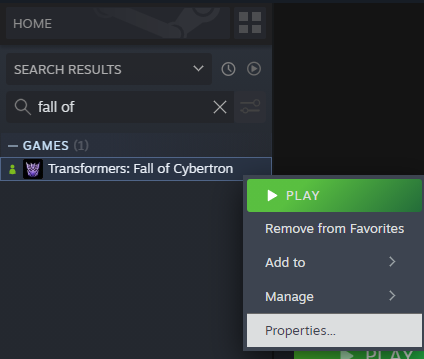
1. Navigate to your game copy on Steam. Right click Transformers: Fall of Cybertron and click “Properties…”
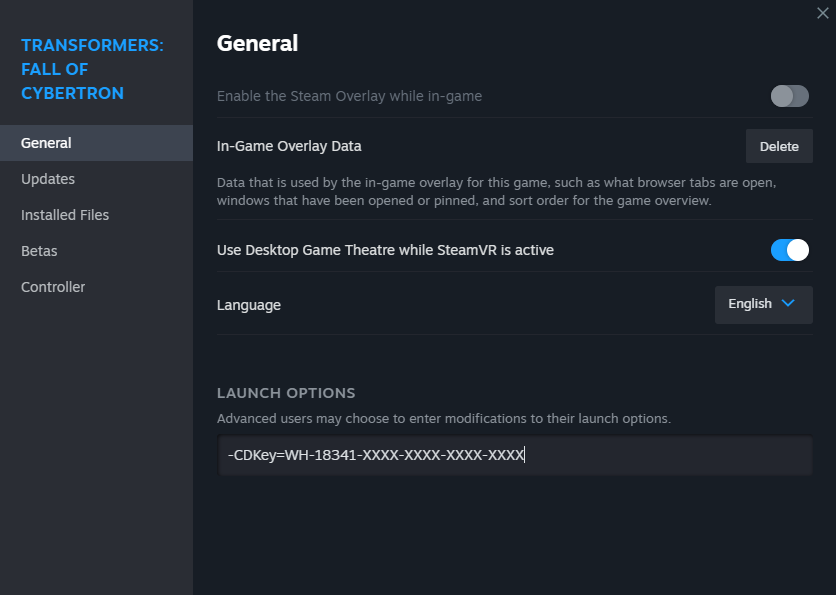
2. Under General, go down to Launch options and type -CDKey=YourCDKeyHere. An example is in the image below.
Remember that your CDKey can be found in @notaibot's dm after you've followed Step 1 of the FOC-PC Guide
3. Launch the game like normal! Your CDKey will now automatically apply