Transformers FOC (PC)
WHS Guide v1.01
1. Download your FOC login key
To get your new key, which makes it possible to connect to Warehouse servers and the WHS system, you will need to join our Discord server and message our bot.
1. Join the Warehouse Discord server via invite link - https://discord.gg/fwkQmPGtfa
2. Complete verification with Double Counter bot.
Note: This requires “Allow direct messages from server members” to be enabled in your Discord “Privacy and Safety” settings,
you will then need to leave and re-join the Warehouse server.
3. Message /wh_registerand select Transformers: Fall of Cybertron (PC) in the #bot-channel

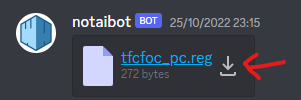
4. Check your DMs for a shiny new key! Press the download button here to save the file. PLEASE DO NOT SHARE THIS KEY UNLESS ITS WITH WAREHOUSE STAFF
Note: This new login key does NOT give you a copy of the game, this page is purely for installing the multiplayer-enabling mod for the game.
2. Move your login key to your Binaries folder
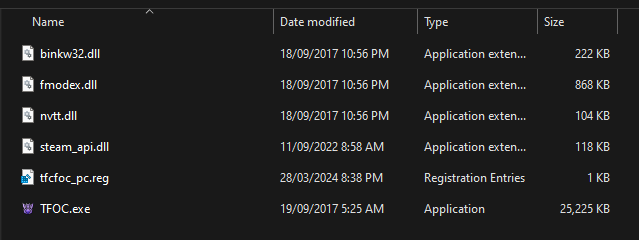
Once you have downloaded your tfcfoc file, please move the file to your Transformers - Fall of Cybertron/Binaries folder. Your binaries will look similar to this after completing this step.
3. Download and install WHS
1. Download the WHS server mod installer from here
2. For fastest installation, place WHS installer inside your Transformers - Fall of Cybertron\Binaries folder. For Steam users, this will be inC:\YOUR_USERNAME\Program Files (x86)\Steam\steamapps\common\Transformers Fall of Cybertron\Binaries.
Your Binaries folder should look like this before installing online mod.

3. Double click wh-updater.exe to install online mod.
4. If your steam_api.dll is not 2,919 kb in size, download manual backup here and extract steam_api.dll into the Binaries folder click here for download
Error 3a.
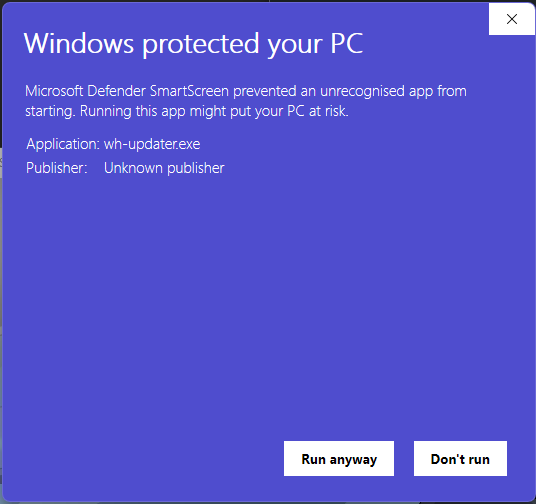
Since this is brand new program, you will most likely get this warning Windows protected your PC
To resolve this, please click “more info” and then “Run anyway”
3b. ERROR - Failed to connect to PRG Server OR Sign in - You must be signed in to play online
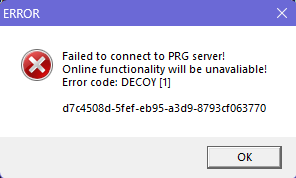
If you encounter this error, please place your tfcfoc login key in your Transformers - Fall of Cybertron\Binaries folder and make sure there is no (1) at the end. It should just be tfcfoc_pc or tfcfoc_pc.reg
3c. Game does not launch - and you do not have steam_api.dll in your binaries folder.
To fix this error, please go into Windows Security > Protection History and find the Steam_api.dll in recent items and press "allow"
4. Launch multiplayer and play
If you encounter any issues upon installing this multiplayer mod, please refer to the above and if your issue is not solved here please ask in the #support channel of our Discord server
4a. If you get “Failed to sign in” please launch game again but do NOT skip the opening videos.
Adding and managing friends with the WHS system
Friends in Fall of Cybertron are no longer managed by Steam, they are now managed by the WHS system. The following commands can be used to add friends.
1. Changing your username
To change your WHS and in-game name, type / and then select whs_rename {YourNewName} in the bot-channel This can be done once every 24 hours.

Note: At the moment, no spaces can be in your username. Use - or _ instead
Minimum username length is 4 characters long, and maximum is 16 characters long.
2. Adding friends
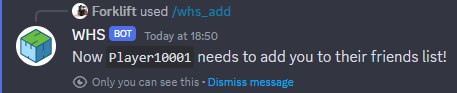
2a. To add someone as your friend, go into the #bot-channel and type /whs_add along with their WHS Username. If the name is correct, it will look like the example included below. Please see section 3 if you wish to remove a friend request.
2b. If the friend request was invalid, it will look like this:
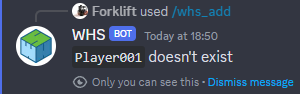
The person you added will need to type / and then select whs_add Enter your username into the text box in order to become friends.
3. Seeing your friends list
In order to see your current friends list. Type in / and then select whs_friends in #bot-channel.
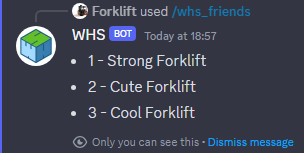
4. Removing friends
To remove friends there are two methods:
Method 1: Type / and then select whs_rm 1 to remove the first person on your friends list from the above tutorial.
Method 2: Type / and then select whs_rm ExampleName to remove by username.
Optional: forward port 7777 UDP
To improve connectivity between clients - forward port 7777 UDP. If you have know idea what is it, or how to do it, just Google:
%your router model name or brand% port forwarding
This should provide you with a sufficient number of guides about how to do it