¶ Need For Speed: Carbon guide v 1.0
¶ 1. Download Game
To play online, you need an unmodified copy of Need for Speed: Carbon updated to version 1.4.
“Unmodified" means:
Not supported:
- New-car mods
- Car-replacement mods
- Overhaul mods (Mod V2, Ultimate Mod, Battle Royale, NFSCO, Improvement Mod V2, Endgame Mod, etc)
- Mods that affect vehicle performance, handling, progression, or game balance (Extended Customization, etc)
Supported:
- Texture replacements
- UI texture modifications
We don't provide links or information about where to get the game.
¶ 2. Registering at the website
1. Navigate to https://warehouse.games
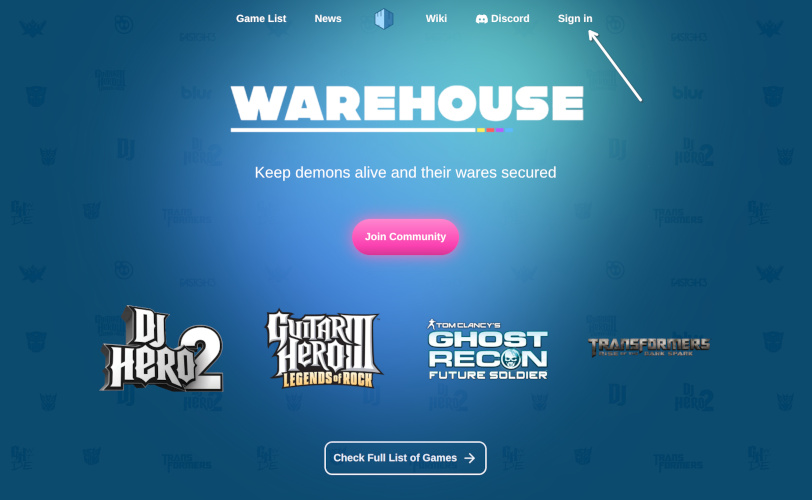
2. Click Sign in and create account via email. Alternatively you can use Discord.
3. After verifying your should be able to get into your profile.
¶ 3. Create in-game Need For Speed: Carbon account
¶ 1. Navigate to your profile
Navigate to your profile at https://warehouse.games/profile
¶ 2. Click “create account” on Need For Speed: Carbon card
¶ 3. Enter your future in-game name and password
¶ 4.1 WH Launcher method
The WH Launcher was made to simplify multiplayer installation and help keep your game updated. Plus it can show current players and sessions. That's pretty much it. I made it as a person who hates launchers, so, no invasive stuff like autorun on system start up and sitting in a tray.
¶ 1. Download and install WH Launcher
Navigate to https://warehouse.games/launcher or just click here
¶ 2. Launch the WH Launcher
On first start-up (or later in settings) you can link the launcher to your website profile, which will download all the necessary files automatically.
¶ 3. Locate Need For Speed: Carbon installation
In most cases this will be done automatically, if automated search fails - you can manually select the game folder on your PC.
¶ 4. Click “Update” button
This will download client files and add your multiplayer key.
If the launcher reports a permission error, close it and run it once as administrator. This may be necessary when the game is installed inside a protected folder such as
Program Files.
¶ 5. Click “Play”
Or launch the game by hand. It's up to you.
Skip 4.2 Manual method section if you used WH Launcher.
¶ 4.2 Manual method
If you opt for manual installation you would need to do some extra steps by hand.
¶ 1. Download client files
¶ 2. Put client files into the game folder
Possible locations:
C:\Games\Need for Speed Carbon\
C:\Program Files (x86)\Electronic Arts\Need for Speed Carbon\
In case you already have plugins folder with your own asi files - just merge and replace. If you don't know what asi files are - ignore this step.
¶ 3. Run the game
¶ 5. In-game
Just use the credential you made on step 3 to login.
Your website credentials and in-game credentials are separate unless the site indicates otherwise. Use the username and password created on the Need for Speed: Carbon profile card when signing in inside the game.
Have fun!
¶ 6. Extra features configuration
¶ NFS Carbon WidescreenFix
WidescreenFix is included in client files, it's config file is located in /plugins/NFSCarbon.WidescreenFix.ini where you can edit graphical related stuff and some minor game fixes.
¶ In-game ads
As a “fun factor” a support for in-game ads was added, which doesn't advertise anything real and included solely as a joke. This feature downloads a small amount of data while the game is running and replaces selected billboard textures with custom fictional advertisements. If you're not a fan of such thing you can disable it in /plugins/nfs-c-mad-client.ini by setting
enable_ads=false
If you don't see the file - launch game once and it will appear
¶ Profanity filter
Since the original game lacks any kind of filter in lobbies we added one. If you're not afraid of such things and not a streamer you can disable it in /plugins/wh-nfs-c-client.ini
enable_profanity_filter=false
If you don't see the file - launch game once and it will appear
¶ Troubleshooting
In case game doesn't launch, crash or you're struggling with any steps - join the Warehouse Discord server via invite link - https://discord.gg/fwkQmPGtfa and create a ticket via #support channel