Transformers ROTF (PC)
Guide v0.2
1. Download your ROTF login key
To get your new key, which makes it possible to connect to Warehouse servers, you will need to join our Discord server and message the bot.
1. Join the Warehouse Discord server via invite link - https://discord.gg/fwkQmPGtfa
2. Message /wh_registerand select Transformers: RoTF (PC) in the #bot-channel

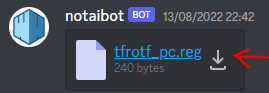
3. Check your DMs for a shiny new key! Press the download button here to save the file to your desktop for later.
2. Add Universal Warehouse Redirector
- Go to release page of Universal Warehouse Redirector here
- Grab the latest
iphlpapi.dllfrom the page - Place
iphlpapi.dllinto Rotf installation folder

3. Applying new key
1. Launch the game.
2. As soon as you see game window Alt-Tab to desktop.
3. Double click tfrotf_pc.reg
4. Agree to every prompt you see.
4. Launch multiplayer and play
Windows 11 users:
In order to play multiplayer, you will need to turn on the game using the Transformers2 executable. This may also require running the executable as administrator.
5. Optional: forward port 3074 UDP
To improve connectivity between clients - forward port 3074 UDP. If you have know idea what is it, or how to do it, just Google:
%your router model name or brand% port forwarding
This should provide you with sufficient number of guides about how to do it.